
 November 25, 2026

 18 min read
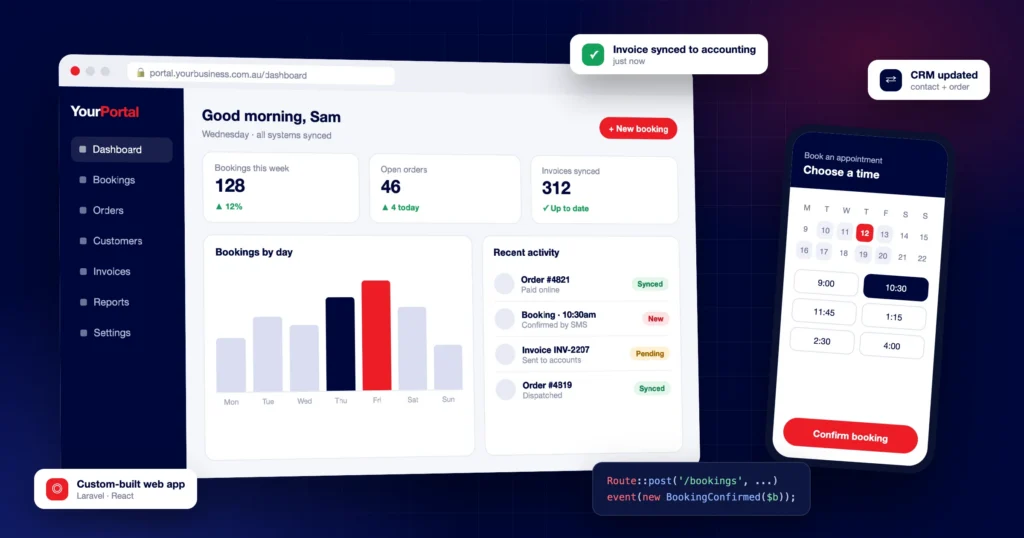
Custom web application development: a guide for Australian businesses
 Written by Shivoma Ahuja, Lead developer
Published: 25 November 2026
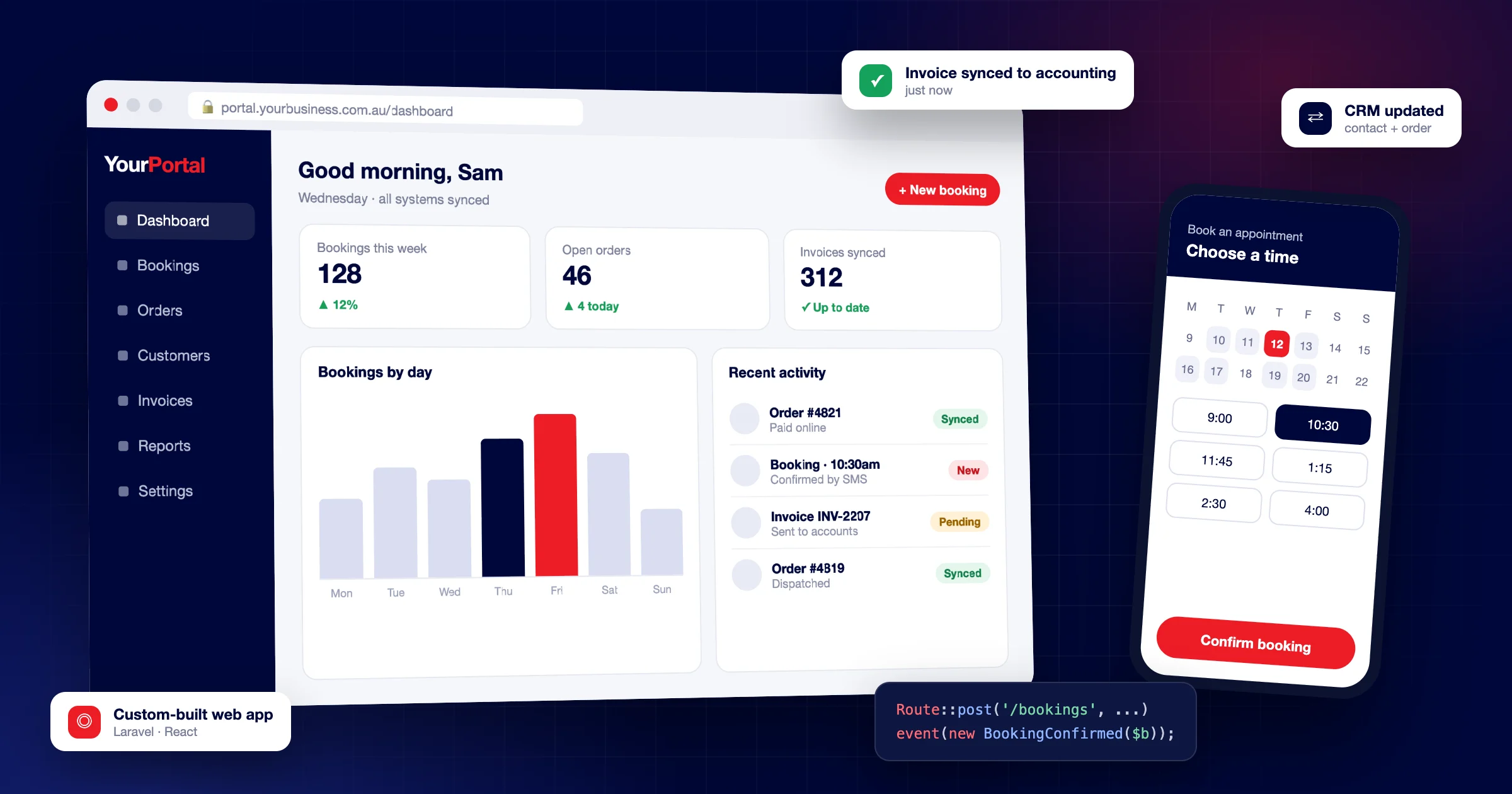
If your business runs on a mix of spreadsheets, plugins and subscriptions that don't quite talk to each other, you're not alone. Most growing businesses get there eventually. At some point, the question changes from "which tool should we use?" to "should we build something that actually fits how we work?"
That's where a custom web application comes in. A web application is software that runs in your browser and lets people get things done, like logging in, booking, ordering or managing records. A website mostly tells people about you. A web app does a job for them.
In this guide, we'll walk through what a web app is, the signs you might need one, how a custom build works, what affects the cost, and what it takes to look after one once it's live. It's based on the custom Laravel and React projects our team builds.
Key takeaways
- A web app helps people complete tasks, like booking, ordering or managing records. A website mainly informs.
- Custom makes sense when your current tools force workarounds, double entry or rising fees. If a tool already covers most of what you need, a simple integration might be all it takes.
- Integrations and user roles usually affect scope and cost more than the number of screens.
- Start with a focused first version, then grow it based on how people actually use it.
- Plan for hosting, security and upgrades from day one. 21% of Australian businesses reported a cyber security incident in 2024–25.
What Is a Web Application?
From the outside, a website and a web app can look pretty similar. They both open in a browser, and they can both look great. The real difference is what people come to do.
| Website | Web application | |
|---|---|---|
| Main job | Inform and persuade | Let users complete tasks |
| Typical users | Anonymous visitors | Logged-in customers, staff or partners |
| Content | Pages, articles, products | Records, accounts, bookings, orders, dashboards |
| Data | Mostly the same for everyone | Specific to each user, often stored and updated constantly |
| Examples | A services site, a blog, a brochure site | A customer portal, a booking system, an internal ordering tool |
In practice, a lot of projects are a bit of both. You might have a marketing website out the front and a web app sitting behind a login. An online store that shows special pricing to trade customers is a good example.
Some web apps can even be installed on a phone like a regular app. These are called progressive web apps, and MDN's guide to progressive web apps explains how they work. If you need features a browser can't handle well, a native app may suit you better. Our mobile app development team can help you work that out.
Signs Your Business Has Outgrown Off-the-Shelf Tools
There's nothing wrong with starting on off-the-shelf software. Software as a service (SaaS) tools are quick to set up and cheap to get going, and for most businesses they're the right first step.
The catch is that more of every business now runs online, so the gaps between tools show up sooner. In 2024–25, 32% of Australian businesses received orders online, and 12% used artificial intelligence, up from just 1% in 2021–22 (ABS, Characteristics of Australian Business 2024–25).
So how do you know when you've hit that point? Here are some of the most common signs:
- Someone is typing the same data twice. An order comes in through the website, then gets re-entered into the accounting system or a spreadsheet.
- A spreadsheet has quietly become "the system". Important information lives in one file that only one person really understands.
- Your team works around the software. Instead of the tool fitting the process, the process gets bent to fit the tool.
- The plugins keep piling up. Every add-on brings another monthly fee, another update and another thing that can break.
- Customers want to help themselves. They'd rather check an order, rebook or download an invoice than call you.
- Per-user fees are getting out of hand. Paying for every staff member or customer login adds up fast.
When we're scoping a project, one moment comes up again and again. Someone walks us through their process, and halfway through they say, "then I export it and type it into the other system." That's usually where a well-planned integration can give hours back each week.
Another common story is a business that's tried two or three different tools, and each one made the team change how they work. That said, custom isn't always the answer. If an existing tool covers most of what you need and the gap is small, some setup or a single integration is often the smarter spend. Custom software is something you'll look after for years, so it needs to solve a problem that's worth it.
Common Types of Custom Web Applications
Customer and Client Portals
A portal is a secure, logged-in area where your customers can see their orders, invoices, documents, bookings or account details. Think of the emails and phone calls you get asking "where's my order?" A good portal answers those before anyone has to ask. Because portals hold personal information, they need careful access control, which we cover in the security section below.
Booking and Scheduling Systems
Online booking that follows your rules, whether that's staff availability, multiple locations, deposits, cancellation policies or reminders. For simple appointments, an off-the-shelf booking tool usually does the job. A custom build starts to make sense when your rules are unusual, or when bookings need to flow straight into other systems.
Integrations With Your CRM, Accounting or ERP
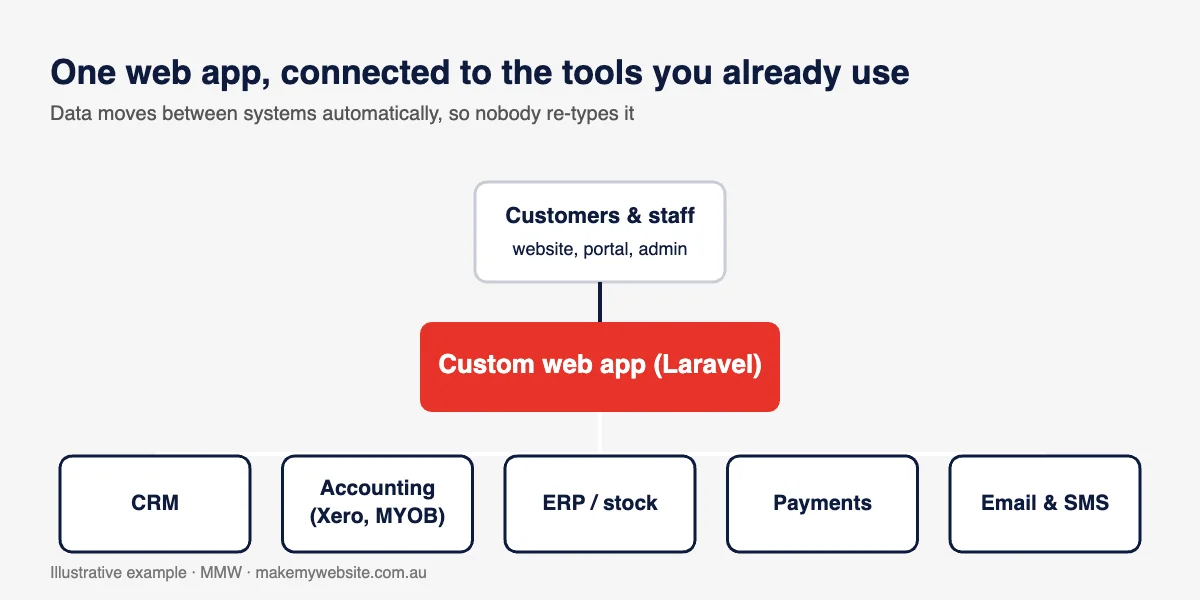
This is about connecting your website or app to the software you already rely on, such as your CRM, accounting software like Xero or MYOB, or an ERP. Once they're connected, data moves on its own. No double entry, and no wondering which version is right.
Ecommerce With Custom Logic
Some online stores need more than a standard platform can offer. Trade pricing, tricky product rules, launching in more than one country, or a headless front end are all common reasons. Our ecommerce development page has more on this.
Internal Tools and Dashboards
Not every web app faces customers. Plenty are built just for your own team, for things like job tracking, quoting, stock, approvals or reporting.
In reality, most of the projects we work on mix several of these together. A typical build might have a customer-facing website, a logged-in area for customers or staff, and integrations moving data between systems. That's why we always look at the whole workflow first, not just the screens.
"Launching a new franchise brand and domain simultaneously in Australia and New Zealand is complex. MMW took the time to understand our business needs, solve for complexities and integrated attributes that set us apart from our competitors… what could have been a difficult project, was delivered and over-delivered with quality and ahead of schedule. Highly recommended!"
Rob Lewis, Owner, About Clean
Choosing the Technology
Honestly, the technology matters less than whether it fits the job and can be supported for years to come. At MMW, we build custom web applications on Laravel, and we bring in React when the interface calls for it.
Laravel for the Application
Laravel is an open-source PHP framework for building web applications. Out of the box, it includes most of what a business app needs, like user logins, database tools, background jobs and a way to talk to other systems' APIs (Laravel documentation).
It also has a clear support policy. For each major release, "bug fixes are provided for 18 months and security fixes are provided for 2 years" (Laravel release notes). When you're planning software that needs to run for years, that kind of predictability really helps.
Laravel runs on PHP, which powers most of the web. W3Techs reports that PHP is used by 67.9% of websites whose server-side language it can identify, as at 24 November 2026 (W3Techs). In the 2025 Stack Overflow Developer Survey, 18.9% of respondents to the programming languages question used PHP, and 8.9% of respondents to the web frameworks question used Laravel (Stack Overflow Developer Survey 2025). A big, established community means it's easier to find developers and tested packages down the track.
For us, Laravel is a solid, well-documented base for the parts every business app needs: logins, permissions, data, background jobs and integrations. That way, your budget goes into the parts that are unique to your business, not rebuilding the basics.
There is a trade-off, though. A custom Laravel app needs a developer to look after it. You can't just install a plugin for a new feature the way you can with WordPress, so ongoing support needs to be part of the plan from the start.
React for Interactive Interfaces
React is a JavaScript library for building user interfaces. It shines on screens that change constantly without reloading the page, like dashboards, filters, shopping carts and live booking calendars.
For new projects, the React team recommends a framework: "If you want to build a new app or website with React, we recommend starting with a framework" (react.dev). Next.js is the first one it lists.
React is also one of the most popular tools on the web. In the same 2025 survey, 44.7% of respondents to the web frameworks question used React and 20.8% used Next.js, with Node.js at 48.7% (Stack Overflow Developer Survey 2025).
The good news is that Laravel and React work well together. Laravel's official starter kits include a React option that uses Inertia to connect the two (Laravel starter kits). We use React when the screens need to feel like an app, with lots of interaction and instant feedback. Laravel handles the back end, React handles the interface, and each does what it's best at. For simpler admin screens and forms, Laravel on its own is often plenty, and a smaller setup is easier to maintain.
When WordPress or Shopify Is Still the Right Answer
Custom isn't automatically better. If you mostly need content, marketing pages and a standard online store, a well-built WordPress or Shopify site will usually be quicker to launch and cheaper to run.
Plenty of businesses end up with a mix of both. For example, a WordPress or Shopify site out the front, connected to a custom Laravel app that handles the things no plugin can. You can read more on our Laravel development and React.js development pages.
How a Custom Web App Project Runs
Every MMW project goes through the same stages: planning, UI/UX design, development, testing, launch and ongoing maintenance. Custom web apps follow that same path. The main difference is that we spend more time planning upfront.
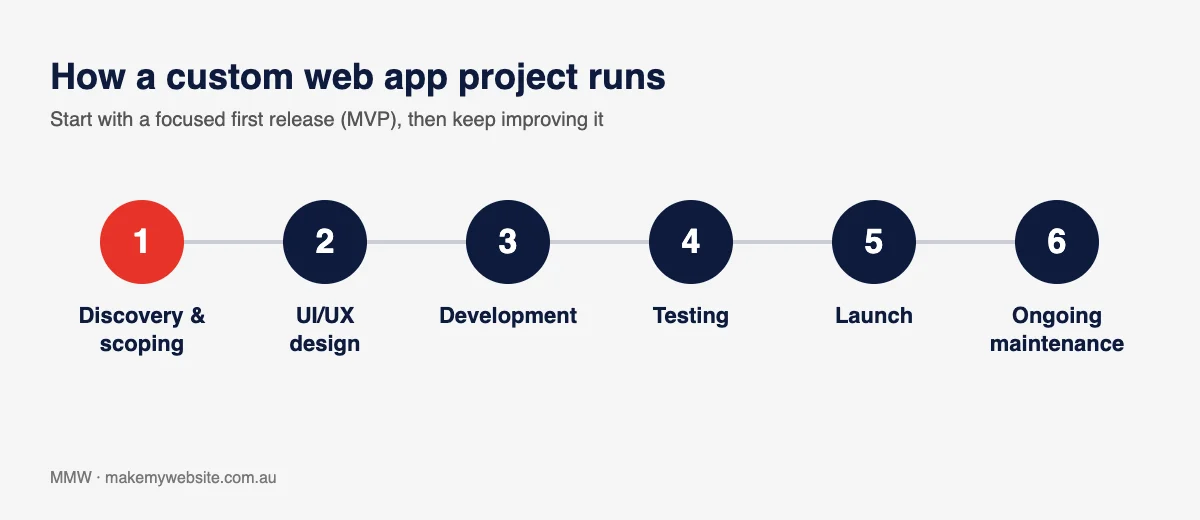
- Discovery and scoping. We map out your workflows, your users, your data and the systems the app needs to connect to. Then we agree on what goes into the first release.
- UI/UX design. We design the key screens and test them against real tasks. Our UI/UX design page explains more.
- Development. The app is built in stages, with regular check-ins so you can see progress early.
- Testing. We test features, devices and browsers, security, and how it all works with real data.
- Launch. We move your data across, go live and keep a close eye on things in the first few weeks.
- Ongoing maintenance. Updates, security patches, framework upgrades and new features as you need them.
We usually recommend starting with a minimum viable product (MVP). That's the smallest version of the app that solves your main problem. Once people are using it, you'll learn what to build next, and the first release stays focused and lower risk.
Discovery is where custom apps really differ from a standard website. Before anything gets designed, we work out who uses the system, what each person needs to do, and where the data comes from and goes. Then we agree what's in the first release and what can wait.
You'll see working parts of the app early and give feedback along the way, instead of seeing everything at the very end. Because timelines depend so much on scope and integrations, we give you one after discovery rather than guessing at the start.
What Drives the Cost of a Custom Web App
We don't publish prices, because every custom build is quoted on its own requirements. What we can do is show you the things that move the cost the most:
- The scope of the first release. How many features and screens go into version one.
- User roles and permissions. Customers, staff, managers and partners who each see different things.
- Integrations. Every connection to a CRM, accounting system, ERP, payment gateway or booking tool adds design, build and testing time. A lot also depends on how good that system's API is.
- Data migration. Moving and cleaning up records from old systems or spreadsheets.
- Design complexity. Custom interfaces, dashboards and reports.
- Security and compliance. Personal, health or financial data raises the bar.
- Ongoing costs. Hosting, monitoring, maintenance and future upgrades.
Integrations are often where the real complexity hides. So much depends on the other system's API and how clean the data inside it is.
It's also normal for new ideas to pop up mid-build. Once people start using a working version, they think of things they hadn't before. We keep a clear list of what's in the current release and park new ideas for the next phase, so your launch stays on track.
It's worth remembering that security incidents cost money too, so it pays to budget for security from the start. You'll see the numbers in the next section. If you'd like a scoped estimate for your project, schedule a call with our team.
Security, Privacy and Accessibility
A web app often holds customer accounts, orders and personal details. That means security needs to be part of the design from day one. It's not something you bolt on at the end. And the risk for Australian businesses is very real:
- 21% of Australian businesses reported a cyber security incident in 2024–25 (ABS, Characteristics of Australian Business 2024–25).
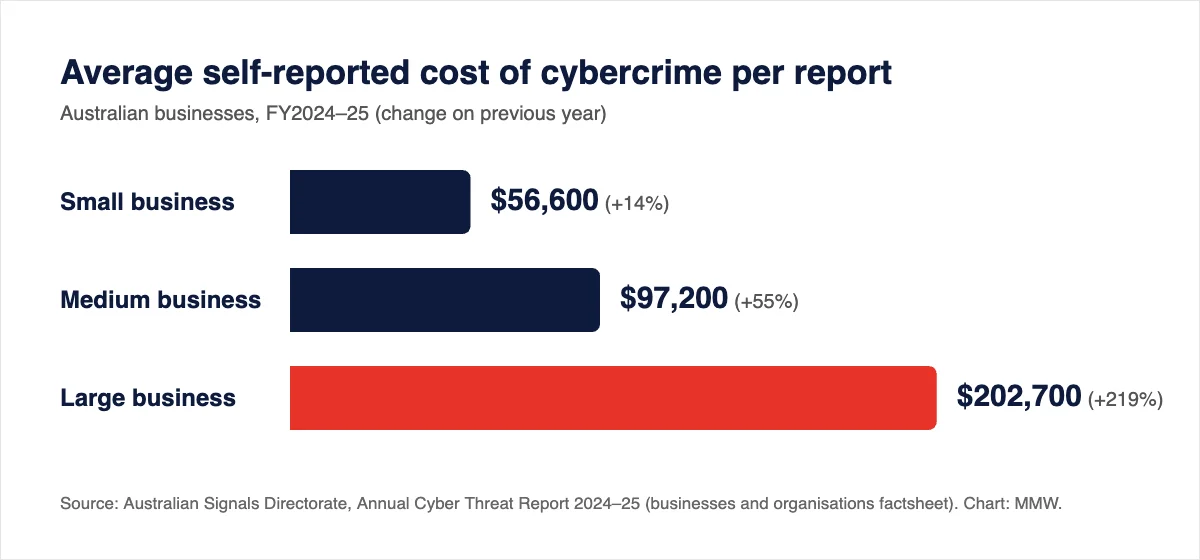
- The average self-reported cost of cybercrime per report in FY2024–25 was $56,600 for small businesses (up 14%), $97,200 for medium businesses (up 55%) and $202,700 for large businesses (up 219%). The ACSC received over 84,700 cybercrime reports that year (ASD, Annual Cyber Threat Report 2024–25: businesses factsheet).
- 1,205 data breach notifications were made to the OAIC in 2025, an 8% increase on 2024. Most of them (716) were put down to malicious or criminal activity (OAIC).
So what does good security look like in practice? Here's where to start:
- Use the OWASP Top 10 as your baseline. It's a widely used list of the most critical web app security risks, and the 2025 edition is based on data from over 2.8 million applications (OWASP Top 10:2025 introduction). Broken access control sits at number one, and OWASP found some form of it in 100% of the applications tested (OWASP A01:2025). For a portal, this simply means making sure each user can only see their own data.
- Follow Australian cyber security guidance. The Australian Signals Directorate's Australian Cyber Security Centre publishes the Essential Eight, a set of strategies to help organisations protect themselves (cyber.gov.au).
- Know your privacy obligations. If your app collects personal information, the 13 Australian Privacy Principles may apply to your business (OAIC). Health service providers made the most data breach notifications in 2025 (225, or 19% of the total), so apps that handle health information need extra care.
- Build it to be accessible. WCAG 2.2 is the current W3C Recommendation for web accessibility, published on 12 December 2024 (W3C). An accessible app works for more of your customers and more of your staff.
On our builds, security is part of every stage. We use Laravel's built-in protections, test that each user role can only reach what it should, keep the framework and its packages up to date, and make sure backups and monitoring are running before launch day.
Hosting, Maintenance and Upgrades
Here's something people don't always expect: a web app is never really "finished". Frameworks change, libraries change, and so do the systems you connect to. It's best to plan for ongoing care from the beginning.
- Hosting. MMW hosts on Australian servers with 24/7 monitoring and backups. Hosting with us is recommended, but it's not required. See web and email hosting.
- Framework upgrades. Each Laravel major release gets bug fixes for 18 months and security fixes for 2 years. Laravel 13 was released on 17 March 2026 and gets security fixes until 17 March 2028, while Laravel 12's security fixes end on 24 February 2027 (Laravel release notes). Apps need planned upgrades to stay supported.
- Ownership. At MMW, clients own 100% of their website.
After launch, we keep watching performance and errors, apply security updates as they come out, and plan major upgrades well ahead of time so your app doesn't fall out of support.
My advice to every client is to set aside a little time and budget each year for maintenance and small improvements. An app that's looked after keeps getting more useful. One that's left alone slowly turns into a risk.
Choosing a Development Partner
Before you sign with anyone, ask to see similar projects they've built. Ask who will actually build and support your app, and how upgrades and handover work. We've put together a separate guide on how to choose a web development agency in Australia if you'd like more on this.
One more tip: get to know your own process before you start. The best projects begin with someone who can explain how the work gets done today, workarounds and all. You don't need a technical spec. The clearer the picture of the problem, the better the software we can build to fix it.
When to Get Help
If a few of the signs above sound familiar, or you're stuck deciding between custom software and yet another subscription, it's worth talking it through with a developer before you commit either way.
Our team plans and builds custom web applications on Laravel and React, from portals and booking systems to integrations with the tools you already use. Take a look at our web app development service, or schedule a call to chat about your project.
FAQs
How long does it take to build a web application?
It depends on the scope, the integrations and how quickly decisions get made. A standard website typically takes 2 to 4 weeks. Custom web apps take longer, and we'll give you a timeline once discovery is done.
Is a web app the same as a mobile app?
Not quite. A web app runs in a browser on any device, while a mobile app is installed from an app store. Progressive web apps sit somewhere in between. They run in the browser but can be installed like an app (MDN).
Can a custom web app connect to Xero or our CRM?
Usually, yes. Most modern business systems offer an API, and Laravel includes tools for working with them. What's possible depends on the system you use, and we check that during discovery.
Do we own the code?
At MMW, clients own 100% of their website.
What happens after launch?
Your app will need hosting, monitoring, security updates and planned framework upgrades. Most businesses also keep adding features once real people start using it.
Sources
- ABS. Characteristics of Australian Business, 2024–25
- Australian Signals Directorate. Annual Cyber Threat Report 2024–25: businesses and organisations factsheet
- OAIC. Data breach notifications increase to all-time high in 2025 · Australian Privacy Principles
- OWASP. OWASP Top 10:2025 · A01:2025 Broken Access Control
- Stack Overflow. 2025 Developer Survey: Technology
- W3Techs. Usage statistics of PHP for websites (accessed 25 November 2026)
- Laravel. Documentation · Release notes · Starter kits
- React. Creating a React app
- MDN Web Docs. Progressive web apps
- W3C. Web Content Accessibility Guidelines (WCAG) 2.2

About the author
Lead developer and project manager at MMW. Shivoma led the About Clean, Metlam and Grocerz builds.
More from Shivoma →


Has your business outgrown its tools?
Talk to our developers about a custom web app on Laravel or React, from portals and booking systems to integrations with the systems you already use.
Schedule a call